Tag: Claude Code

  • shadcn/improve: Free AI Code Audit Skill

    shadcn/improve: Free AI Code Audit Skill

    There’s a quiet tax on using AI to write code, and it isn’t the subscription. It’s that the model smart enough to understand your codebase is also the most expensive one to run — so every fix, every refactor, every small change gets billed at the top rate. shadcn/improve, a free agent skill from the creator of shadcn/ui, is built on a simple inversion of that problem: let the expensive model do the thinking once, and let the cheap models do the typing. It’s sitting at #4 on GitHub trending today, up 333 stars in a day to 10,454 total, and it’s one of the most practical AI dev tools to trend in a while — because the idea is obvious the moment you hear it, and the execution is more careful than the idea suggests.

    The plan is the product

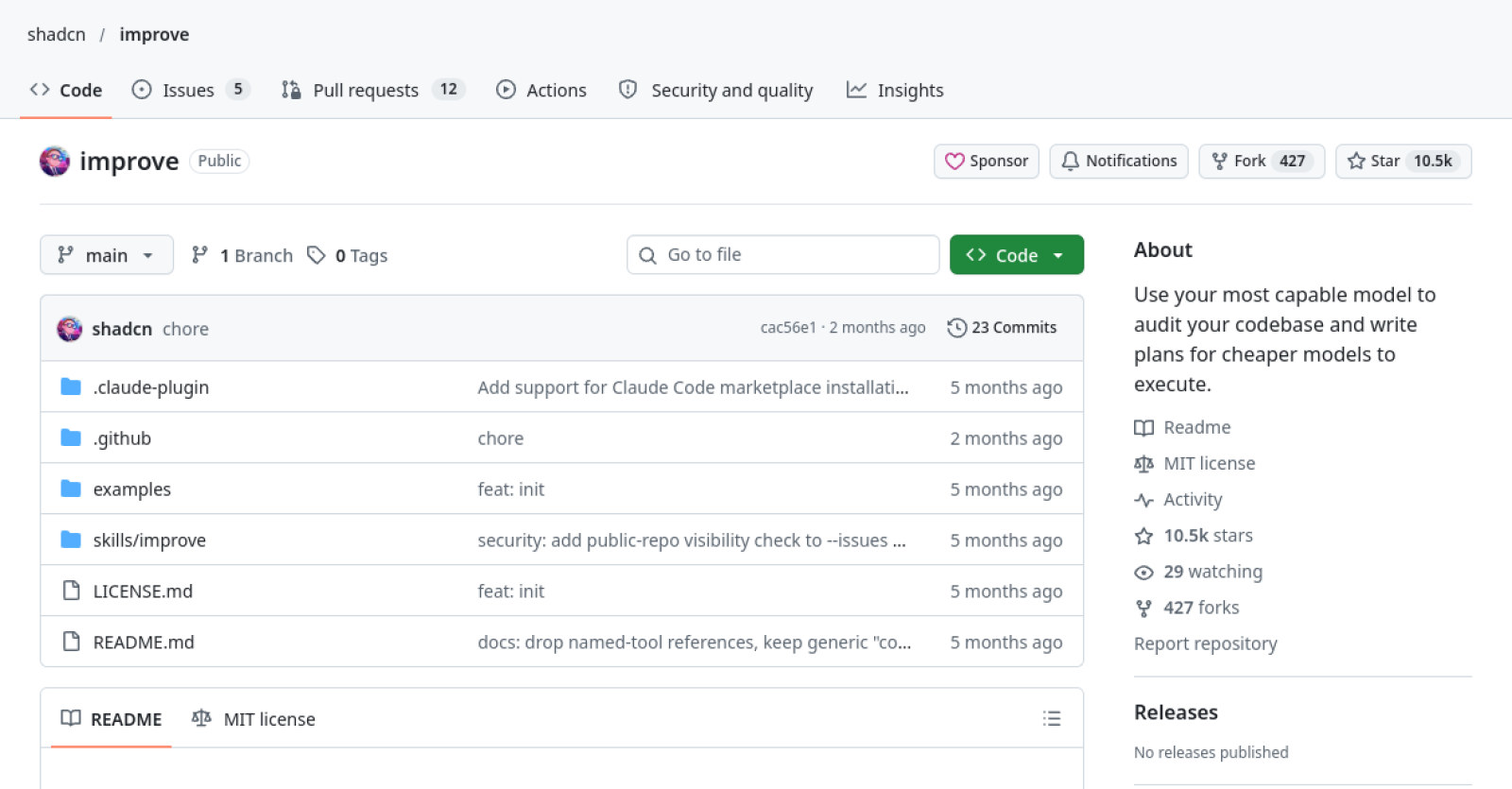
    The tagline on the repo says it plainly: “Use your most capable model to audit your codebase and write plans for cheaper models to execute.” That’s the whole tool. You install it with npx skills add shadcn/improve, and it works in any agent that supports the Agent Skills format. Run /improve and the skill audits your codebase — nine categories, from correctness and security to performance, test coverage, tech debt, dependencies, developer experience, docs, and direction — with every finding carrying file-and-line evidence, an impact rating, an effort rating, and a confidence rating. Then it vets its own findings: an advisor pass re-reads every cited location, drops the false positives, and records the rejections. Then it prioritises by leverage — impact divided by effort, weighted by confidence — and writes one plan file per finding into a plans/ folder, plus an index with the recommended order.

    The key design decision is what the skill refuses to do. It never modifies source code itself. The only files it writes are the plans. It never runs commands that mutate your working tree — read, search, and read-only analysis only. And it never reproduces secret values: it records locations and credential types, and recommends rotation. If you ask it to implement something, it declines and points at the plan. The plan is the product, and the product is a markdown file any agent — or a human — can pick up and follow.

    That matters because the pitch only works if the plans are good enough for a weak model to execute. The skill is designed around that: every plan is self-contained, with all context inlined — file paths, code excerpts, conventions, verified build, test, and lint commands — and every step ends with a command and an expected output, a machine-checkable definition of done. There are explicit out-of-scope lists and stop conditions instead of letting a small model improvise, and each plan stamps the git commit it was written against, so drift can be checked mechanically later.

    Eleven commands, one workflow

    The skill ships with eleven commands, and they map to a workflow that feels like a small team rather than a single prompt. /improve runs the full audit. /improve quick does a cheap pass over hotspots and top findings only. /improve deep is exhaustive — every package, every category. /improve security runs a focused security audit, and there are focused variants for performance, tests, and bugs. /improve branch audits only what the current branch changes. /improve next suggests features. /improve plan <description> skips the audit and specs one thing directly. /improve review-plan <file> critiques and tightens an existing plan. /improve execute <plan> dispatches a cheaper model in an isolated git worktree, reviews its diff against the plan, and reports a verdict — approve, send back for up to two rounds, or block and refine. Merging always stays your call. And /improve reconcile refreshes the backlog next session: it verifies done plans, investigates blocked ones, refreshes drifted plans, and retires fixed findings. Add --issues and plans get published as GitHub issues with the same self-contained body.
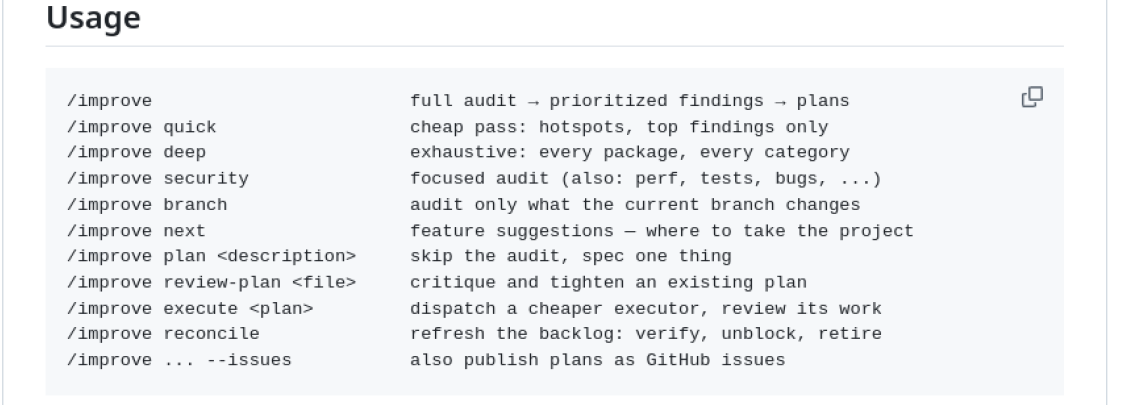
    Screenshot of the shadcn/improve README usage section
    Screenshot: github.com/shadcn/improve

    The worked example in the README is a run against shadcn/ui itself, and it’s worth reading for what it shows about the vetting step. The audit found a shadow-config duplicated across search.ts and view.ts, with the copies already drifted — tech debt, medium effort, high confidence — and an O(n²) icon migration in migrate-icons.ts:168 — performance, small effort, high confidence. It also rejected a finding, with the reason recorded: an https_proxy environment variable flagged as an SSRF risk was by design, a standard proxy convention every CLI honours. That’s the kind of false positive that erodes trust in automated audits, and the skill’s answer is to show its working and its rejections rather than hide them.

    What it costs, and the honest caveat

    The skill itself is free — MIT licensed, installed with one command, no subscription, no API key required by the skill itself. It runs inside whatever AI coding agent you already use, so you pay that agent’s normal usage. The real cost is model usage: the audit runs on your most capable, usually most expensive, model, and execution runs on cheaper ones. That trade only saves money if your cheap executor is actually cheaper than running the strong model for everything — which is true in most setups, since the price gap between frontier and mid-tier models is large — and the plans still need human review before merging. The skill is explicit that merging stays your decision, and that the executor’s work gets reviewed against the plan before it comes back to you.

    There’s a second caveat worth stating plainly: none of this has been independently benchmarked. The claim that the plans are executable by “the weakest plausible executor,” the claim that vetting drops false positives, the nine categories and the leverage ordering — all of that is the project’s own description of its design, not a third-party test. No independent review was found in this research pass. The repo is also young in a specific way: created June 10, 2026, 23 commits, zero releases, last commit two months ago, five open issues, twelve open pull requests. That’s normal for a skill repo — it’s a small set of files, not a product with a release train — but it means you’re adopting one person’s workflow, not a maintained platform. The author is shadcn, whose shadcn/ui component library is one of the most widely used in the React world, which is presumably why the repo has 10,454 stars and 427 forks despite being a single skill.

    Don’t confuse it with Google Skills

    If you read corei10.com regularly, you may remember Google Skills, the 186-skill catalog for Google Cloud we covered on November 6. Same “agent skills” theme, different thing entirely. Google Skills is a catalog — a library of skills you pick from, each one teaching an agent how to do a specific cloud task. improve is a single workflow skill: audit a codebase, write plans, hand them to cheaper models. You could, in principle, use both — one to run your cloud, one to clean up the code that runs on it — but they solve different problems, and improve is the one with the money-saving pitch. If you’re already using Claude Duet or Muse Spark Open for agentic work, improve slots into the same stack: the agent does the thinking, the plan does the talking, and the cheaper model does the typing.

    Who should try it

    The audience is narrow and that’s fine: developers with a codebase they actually work in, using an AI coding agent that supports the Agent Skills format. If that’s you, the install is one command and the first run costs you one audit on your best model. Start with /improve quick rather than the full audit — it’s the cheap pass, and it’ll tell you within minutes whether the findings are worth anything for your code. If the findings are mostly noise, you’ve spent one audit. If they’re real — duplicated config, an O(n²) loop hiding in a migration script, a security flag that’s actually by design — then the plans folder starts paying for itself, because every plan is a piece of work a cheaper model can now do without re-reading your whole codebase. That’s the bet: pay once for understanding, and never pay for it again.

    Also today: November Pixel Drop: Pixel Tag, Gemini & More and Ring Drone Cam: $250 Flying Camera Ships Jan 27.
  • Google Skills: 186 Free Agent Skills for Google Cloud

    Google Skills: 186 Free Agent Skills for Google Cloud

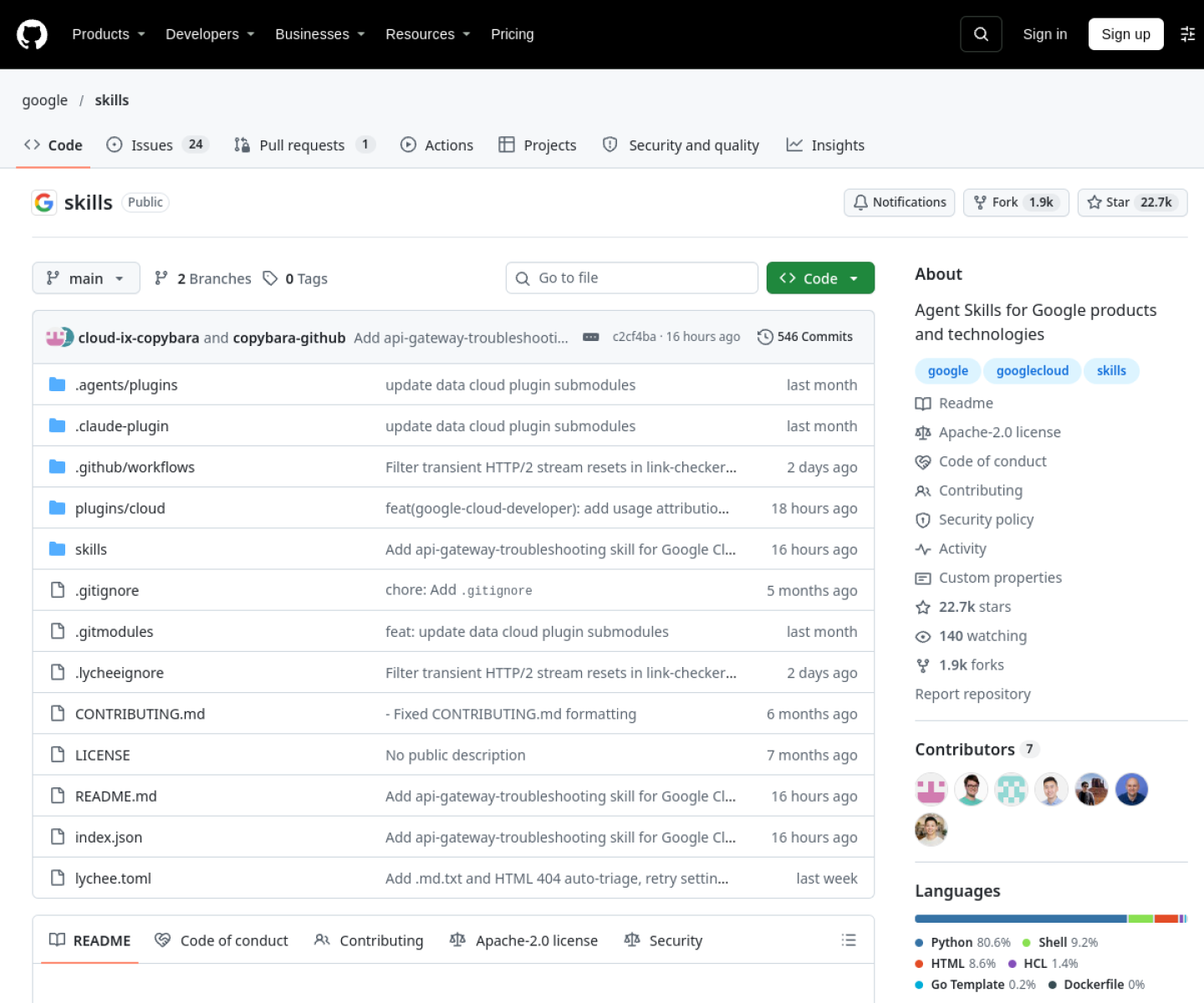
    Here’s a sentence that would have sounded strange a year ago: the most useful thing Google published for developers this week isn’t a model or a console update — it’s a folder of instructions. The repo is google/skills, and it’s trending at #9 on GitHub today with 532 new stars in a day and 22,640 total. It contains 186 Agent Skills: step-by-step playbooks that teach an AI coding agent how to do Google Cloud work the way Google recommends doing it — setting up projects, tuning Gemini models, building RAG pipelines, debugging GKE clusters, writing BigQuery queries, and dozens more.

    The skills themselves are free and open source under Apache 2.0. Installing them takes one command. The catch, and it’s a real one, is that the work they do happens in your own Google Cloud project — and Google Cloud bills by the hour. The skills are free. The infrastructure they spin up is not.

    What an Agent Skill actually is

    An Agent Skill is a folder containing a SKILL.md file: metadata (a name and a description) plus step-by-step instructions, optionally bundled with scripts, reference docs and templates. The format was originally developed by Anthropic and released as an open standard. Agents load skills through progressive disclosure — only the names and descriptions load at startup, the full instructions load when a task matches, and the agent follows them from there. Installing the whole 186-skill catalog costs almost no context until a skill is actually used, which is why a catalog this big is practical at all.

    That design is what makes this repo more than a documentation dump. A skill for tuning a Vertex AI model doesn’t just link to the docs; it walks the agent through the workflow — which commands to run, which parameters matter, which checks to do before spending money. The difference between reading documentation and following a skill is the difference between knowing how something works and having someone experienced standing over your shoulder while you do it.

    One command to install

    npx skills add google/skills

    That’s the whole install. The installer prompts you to pick specific skills or all of them, which target agents to configure, and whether the scope is a single project or global. To update later:

    npx skills update

    The only prerequisite is that npx is available — install Node.js if it isn’t, since npm and npx come with it. There are also plugin routes for the three big agent harnesses: Claude Code (claude plugin marketplace add google/skills, then install the plugin), Codex (same pattern through its plugin browser), and Antigravity CLI (agy plugin install with the plugin path). The README doesn’t enumerate the full list of agents the installer supports, so if your agent isn’t one of those three, run the installer and see what it offers rather than assuming.

    What’s inside: 186 skills, and a lot of GKE

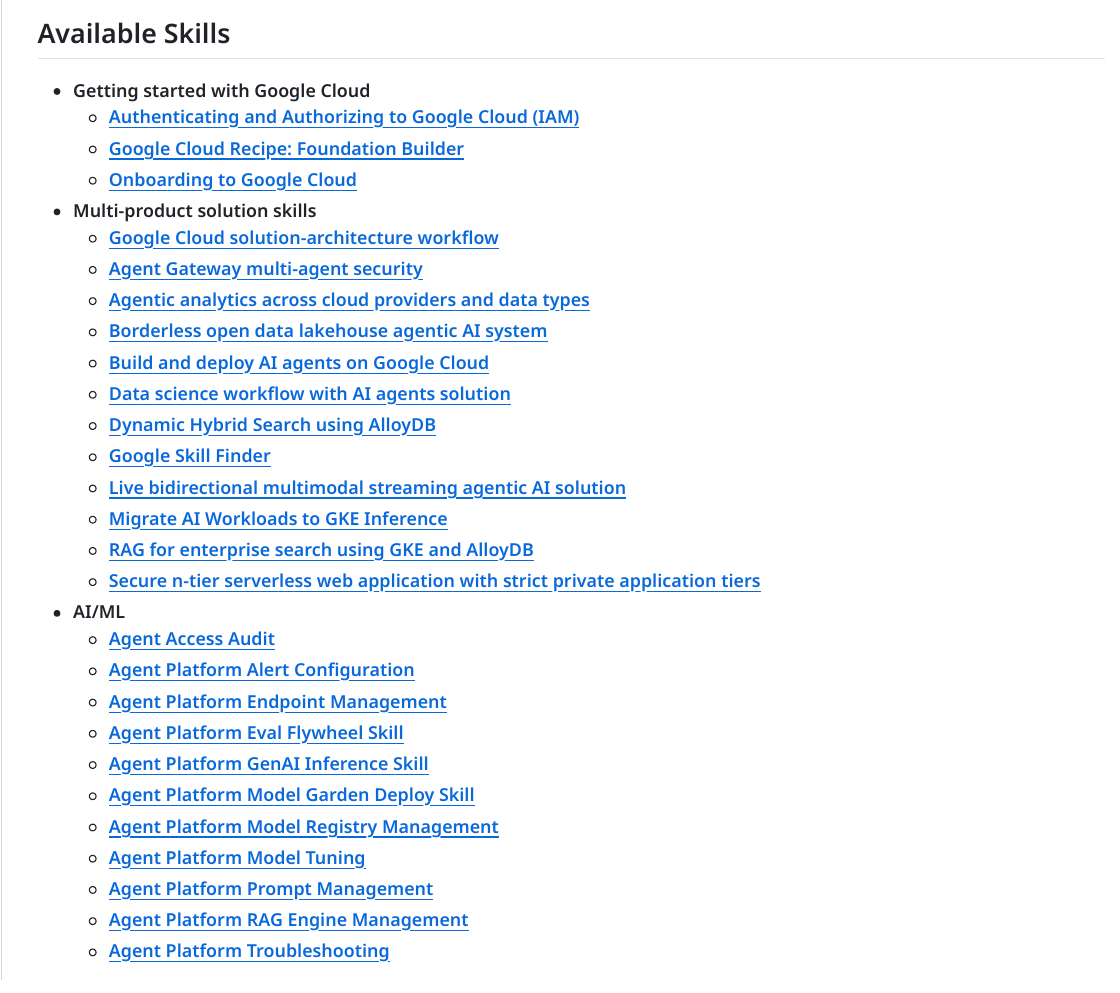
    The catalog is deep rather than broad — it covers Google’s world, and only Google’s world. The breakdown, counted from the repo’s own index, runs like this:

    google/skills README Available Skills list
    Screenshot: github.com/google/skills — the README’s Available Skills list.
    • Getting started (3 skills): onboarding to Google Cloud, authenticating and authorizing with IAM, and a Foundation Builder recipe. The onboarding skill is the one to read first: it requires a personal Google account and a valid payment method for identity verification and to activate the $300 free-trial credit, and it walks through gcloud auth login, project creation and linking a billing account. Deploying anything requires billing enabled.
    • AI/ML (28 skills): Gemini and the Vertex AI Agent Platform, including RAG Engine management, an Eval Flywheel, model tuning and tuning management, Model Garden deployment, Model Registry, endpoint management and prompt management; Genkit in Dart, Go, JavaScript and Python; LiveAPI; BigQuery AI and ML; and an API Gateway remote MCP server.
    • Infrastructure (44 skills): heavily GKE-weighted — around 25 of them cover cluster creation, autoscaling, networking, storage, upgrades, TPU troubleshooting, cost analysis and reliability — plus Cloud Storage, Compute Engine reservations, Filestore, load balancers and networking observability.
    • Databases and analytics (19): BigQuery (basics, optimization, troubleshooting, UDFs, observability, migration and a SQL translator, BigFrames), AlloyDB, Bigtable, Cloud SQL, Spanner, Managed Airflow and data lineage.
    • Security and identity (23): IAM in several flavours, Google SecOps (case management, detection engineering, incident and entity investigation, alert triage, threat hunting), Security Command Center, Cloud Armor, Assured Workloads, Sign In With Google and DPoP identity security.
    • Management tools (19): Cloud Monitoring (chart generation, PromQL, alert configuration, notification channels, an SLO wizard) and Cloud Logging, plus Cloud Trace and GKE observability and cost.
    • Well-Architected Framework (6): one skill per pillar — cost optimization, operational excellence, performance, reliability, security and sustainability.

    Seven more skill packs live in separate repos — Advanced Google Cloud Storage, Agent Development Kit, Android, Dart, Firestore, Flutter and Google Maps Platform — so the 186 in this repo is the core, not the ceiling.

    The honest caveat: the skills are free, the cloud is not

    This is the part the star count doesn’t tell you. A skill is text. It tells an agent how Google recommends doing something, and then the agent executes real, billable commands against your own project — creating projects, linking billing, deploying infrastructure. A misread step can spin up chargeable resources, and the skills automate exactly the parts of that process (enabling service APIs, creating resources) where costs start accumulating.

    To Google’s credit, the onboarding skill builds in guardrails: pre-execution audits, mandatory consent before project or billing changes, and spend-control chaining. Read the skill before you run it, and read it again before you let an agent execute the expensive steps. The $300 first-time free trial and the Free Tier give you room to experiment, but the trial is a one-time cushion, not a permanent shield.

    Two more honest notes. First, coverage is Google-only and vendor-written: the content reflects Google’s recommended way of doing things, and it can go stale as services change. “Google’s own playbook” is a fair framing; an independent benchmark it is not. Second, roughly a quarter of the catalog is GKE. If your work lives on Google Cloud, that’s a gift. If it doesn’t, most of this repo won’t apply to you — and that’s fine, because the install lets you pick individual skills instead of all 186.

    Who should install this

    If you already use Claude Code or Codex and you already work in Google Cloud, install it today — the onboarding and IAM skills alone will save you the kind of fumbling that eats an afternoon. If you’re learning Google Cloud, it’s arguably the best structured path into the platform that currently exists, because it teaches by doing real tasks instead of presenting reference pages. If you don’t use Google Cloud at all, skip it; a playbook for a platform you don’t run is just a reading list.

    And if you’re the kind of person who reads trending repos to find what working developers are actually adopting, the signal here is worth noting: 22,640 stars since March, 546 commits, and a catalog that grew to 186 skills in seven months. That’s not a demo. That’s a team shipping a new kind of documentation — one written for the agent sitting next to you, not the human reading the manual.

    For more on the AI-agent wave, see our Meta Muse Spark Open release, Anthropic’s Claude Duet agent, and today’s Meta Muse voice rollout.

    Also today: Xbox Cloud Gaming Phone Controller: Play on TV Now and Meta Muse Voice: Talk to Your AI With a Face.

    Related: Astryx: Meta’s Free Agent-Ready Design System

    Another agent skill worth a look: shadcn/improve audits your codebase with your best model, then writes plans for cheaper models to execute.