If you let an AI coding agent loose on your codebase, you know the moment that matters most is not when it starts working. It is when it comes back with a plan and asks, in effect, “shall I?” In a terminal that question is a wall of text and a yes/no prompt, and most of us hit yes faster than we should. Plannotator is a free, open-source tool built for exactly that moment — a local, browser-based workspace where you read the plan, mark it up, and send structured feedback back to the agent. It surged on GitHub Trending today, gaining roughly 860 stars in 24 hours to reach about 11,600, and it is the most practical AI-agent tool to trend this week.
The idea is simple enough to explain in one sentence. Plannotator plugs into your coding agent through plugins, hooks, and commands. When the agent proposes a decision, a plan, or a chunk of HTML — or finishes working — the app opens in your browser and you mark it up, comment, and send the feedback straight back to the agent for it to act on. It is not another agent. It is the human checkpoint between the agent’s output and its next action.
The plan review that started it
The core feature is plan review, and it works through a hook. When an agent proposes a plan — in Claude Code, that is the ExitPlanMode step — the hook intercepts the approval and opens the plan in Plannotator’s browser UI. You annotate inline, mark deletions, suggest replacements, and approve or deny. Approve, and the agent proceeds. Deny, and your feedback goes back to it as structured input for its next turn. Plan revisions are versioned, with diffs showing what changed between versions, so you can see whether the agent actually took your notes or just rearranged them.
That sounds like a small thing until you have approved a plan you did not read properly. A polished plan can still describe a bad implementation, and a terminal prompt does not invite careful reading. Plannotator’s bet is that the review surface is the weak point in the agent workflow, and that fixing the surface changes how carefully people review. One independent reviewer put it well: the tool is “worth evaluating if terminal plan approval and raw diffs have become weak points in your agent workflow” — and “less compelling if your existing IDE and pull-request review process already provide the control you need.” That is a fair framing, and it tells you who this is for: people whose agent workflow has outgrown the terminal, not people who already review everything in a proper PR flow.
One inbox for all your agents
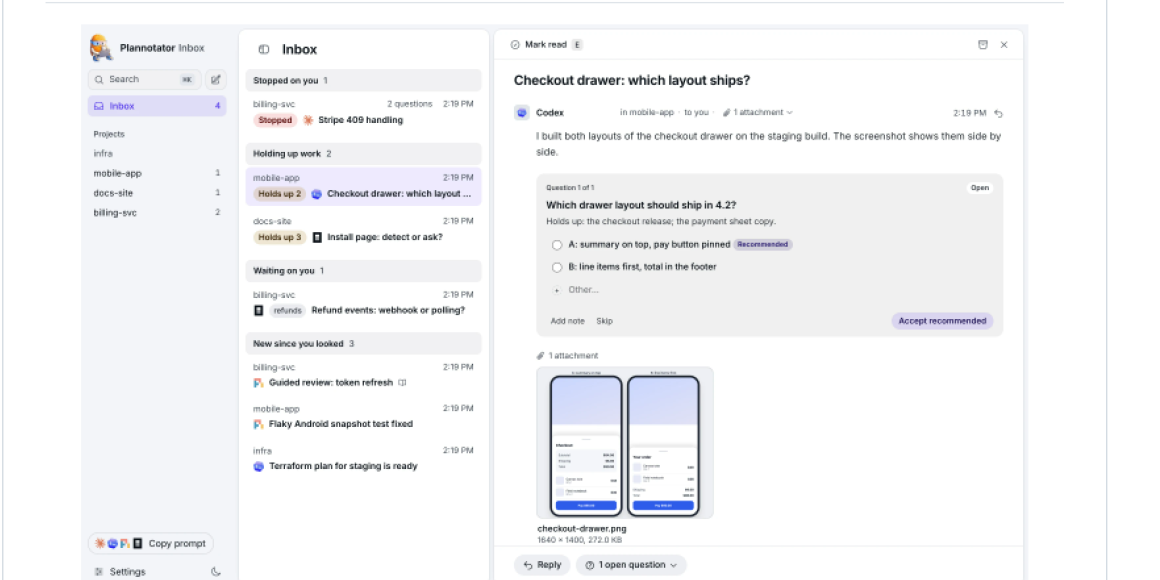
The headline feature in the current release is the Plannotator Inbox. Run `plannotator inbox` and you get one local window where multiple agents leave you messages, questions, files, and guided reviews while they keep working. You reply when you are ready; nothing holds a session open. Claude Code, Pi, and OpenCode connect through Plannotator’s plugins, and any other agent reaches the inbox over MCP. Personal assistants are in the mix too — Grok Bot, Muse, Hermes, OpenClaw, and T3 Code are named in the README.
The screenshot in the README shows what that looks like in practice: a guided review asking “Checkout drawer: which layout ships?” with two options, a recommended choice, and an Accept button. The agent did the work of building both layouts; the human makes one decision and moves on. That is the whole pitch in a single screen — the agent works asynchronously, the human decides asynchronously, and neither one waits on the other.
Code review gets the same treatment. The `/plannotator-review` command opens a PR-style diff viewer — side-by-side or unified, with a file tree, line-level comments, code suggestions, and stage/unstage — for uncommitted changes, a GitHub PR URL, or a GitLab MR URL. It works with Git, GitButler, Jujutsu, Perforce, GitHub, and GitLab. There is also `/plannotator-annotate` for marking up plans, specs, Markdown, rendered HTML artifacts, and URLs, and `/plannotator-last` for annotating the agent’s last message. Approved plans can be saved to Obsidian, Bear, or Notion, and a VS Code extension opens reviews in editor tabs. There is even a terminal variant, Herdr Annotate, and a standalone TUI installable with Homebrew.
Install it in one command
Installation is a single command — `curl -fsSL https://plannotator.ai/install.sh | bash` on macOS, Linux, or WSL, or the PowerShell equivalent on Windows. The installer auto-detects which agents you have installed and configures the hooks, skills, and slash commands for each. Claude Code needs one extra step, adding the plugin marketplace and installing the plugin; OpenCode takes a plugin line in `opencode.json`; Pi installs an npm extension; Codex, Gemini, and Kiro need nothing extra. Supported agents, per the README, are Claude Code, Codex, Copilot CLI, Gemini CLI, OpenCode, Kiro, Droid, Amp, DeepSeek Harness, and Pi — though the integration depth is not uniform, and that matters: Codex plan review is experimental, Droid is commands-only with no plan interception yet, and behaviour varies by agent and operating system.
The project is genuinely active. Created on December 28, 2025, it has 9,288 commits and 228 releases, with the current version v0.28.65. The release cadence is almost daily — v0.28.51 to v0.28.65 arrived in about nine days — and the release notes show nearly all pull requests coming from the maintainer, backnotprop. It is licensed Apache 2.0 or MIT at your option, and the local tool is free with no paid tier and no subscription. That is the whole pricing story for the local tool. The workflow itself is not free, of course: your coding agent’s own subscription or API costs still apply, and the optional Ask AI and review agents send context to your configured provider.
The honest caveats
Plannotator describes itself as local-first, and the README says it “does not collect usage telemetry or analytics” and that “plans, diffs, annotations, drafts, history, and configuration stay local by default.” That is true, with a wrinkle worth stating plainly: every review surface checks GitHub for the latest release on load, with no opt-out, and URL annotation goes through the third-party Jina Reader by default — which has rate limits unless you supply an API key. Remote mode listens on `0.0.0.0` with no login, so anyone who can reach the port can use it. None of that makes the tool unsafe for its intended use, but “local-first” and “fully offline” are not the same thing, and the README documents both halves of that in the same section.
Two more caveats. First, the team-sharing story is unsettled: the legacy open-source link sharing is “moving to deprecated support” in favour of Plannotator Workspaces, a hosted team layer with shared plans and review history — but Workspaces is waitlist-only with no public pricing, so teams have no stable hosted path today. Second, the single-maintainer shape and the near-daily release churn mean you should pin a version before relying on it in a real workflow; the project is eleven months old and still moving fast.
And the trending claim itself deserves the usual care. The surge is real — live counts confirm the scale — but trending trackers disagree on the rank and the daily-star figure, so the safe statement is that Plannotator surged on GitHub Trending today, gaining roughly 860 stars in 24 hours. Independent coverage is thin and mostly aggregator reviews rather than hands-on testing by major press, so the star count is genuine momentum, not proof of production adoption.
Who should try it
If you work daily with Claude Code, Codex, Copilot CLI, Gemini CLI, OpenCode, Kiro, Droid, Amp, or Pi, and you have caught yourself rubber-stamping a plan you did not really read, Plannotator is a free, one-command experiment that addresses exactly that habit. The Inbox alone is worth a look if you run several agents at once. If your review already happens in a proper pull-request flow and your IDE gives you the control you need, this will not change much for you. The tool does not make your agent smarter or your plans better — it makes the moment you say yes a little slower and a lot more informed. For a tool that costs nothing, that is a reasonable trade.
Screenshot: github.com/backnotprop/plannotator
Also today: ChatGPT Wallet: your AI agent can pay — but only with your Face ID and worse_query: the iPhone flaw Apple hasn’t fixed — and who is actually at risk.
Also today: AG-UI, the free protocol that lets any AI agent talk to any app, is #1 on GitHub trending
Also see: Univer: the free open-source SDK for building your own AI office
Also trending on GitHub: last30days, the free AI skill that researches any topic across Reddit, X, YouTube and Hacker News.